
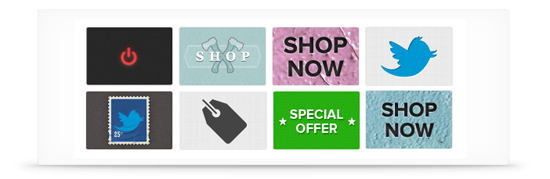
Did you know that with the new Facebook Timeline for Pages you can set the icon image that is used to identify your applications? This is a great way to give your Facebook Page that little bit more customization, and get your fans to engage with your apps.
We have come up with a free set of perfectly sized images for you to download and use as icons to make your Timeline applications stand out. Feel free to use as many of them as you like.
![]()
Download Your Free Facebook App Icon Set Now
Enter your email address below and we will send you a link to download a .zip file containing all of the Facebook App icons, ready to upload to your Facebook Page.
[download file="/wp-content/uploads/2012/03/FB-Timeline-App-Icons.zip" title="The Facebook Custom App Icon Set"]
How to Change Your Application Thumbnails
Follow these simple steps in order to change the icon for an application on your Facebook Page:
- Open the admin panel for your Facebook Page

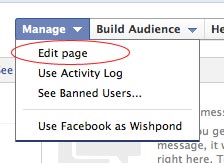
- Find the Manage menu drop down, and select ‘Edit Page’
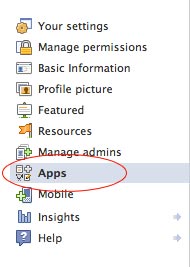
- In the left menu select Apps
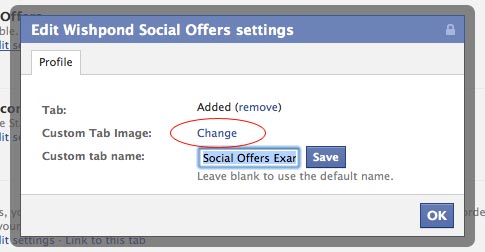
- Find the app that you want to change the icon for, and click ‘Edit Settings’ underneath the icon name and description.

- Click ‘Change’ next to the Custom Tab Image option
- Facebook will take you to a new screen, here you need to click ‘Change’ again next to the app icon.
- Facebook will then take you through the process of uploading a new image.

Note that some app developers do not let you change their application’s icons, in which case you are stuck with what they gave you – sorry!
If You Want to Create Your Own Facebook Timeline App Icons
Of course, you might want to come up with your own custom thumbnails to really make your page unique. If you do, the dimensions for the thumbnail images are 111 pixels wide by 74 pixels tall. Good luck!
Do you have any special requests for Facebook App Icons? If so, let us know in the comments below and we will see what we can do.
Want to learn more about getting the most from Facebook Timeline?
Download our free 25-page ebook ‘Social Success: The Ultimate Retailers Guide to Growing your Business on Facebook‘.

No problem. Enjoy!
Excellent – glad that we could help out. Thanks Christine.
Thank you so much! I have been trying to find a good replacement for the Etsy shop app since Facebook switched to timeline, and the ability to customize the icon is just perfect! You guys are awesome (:
No problem Alyssa, glad you are enjoying the app.
how do i remove a category on my social store tab?
@seandsmith - best to drop an email to our support team on that one (support @ wishpond.com). The fix depends on the import method that you have chosen for your store.
Nice website. I was checking constantly this site and I am impressed! Very useful information specially the last part I care for such information much.



